OpenShift-3
OpenShift Networking (an introductory effort)

> OpenShift Network Architecture
In this article I will give an introduction to OpenShift’s network design. Let me say at the outset that I have no (professional) affiliation with RedHat or OpenShift. I share these articles and related posts on LinkedIn with the intention of helping myself first and then others. I think that’s obvious, so let’s get to the point.
OpenShift’s network design helps containers, services, and users communicate smoothly inside and outside the cluster. It expands on k8s networking with extra tools for control and visibility. A lot of things we know from k8s we won’t repeat here, but we will still point out some reminders. Each Pod in OpenShift gets its own IP and communicates through a flat network called the Cluster Network. K8s Services hide these IP addresses behind stable IPs and DNS names.
OpenShift handles internal networking with CNI plugins. OpenShift SDN used to be the default, but from OpenShift 4.6 onward, OVN-Kubernetes is recommended. Both plugins meet basic networking needs, but OVN-Kubernetes provides better scalability, security, and flexibility. Let’s take a closer look at what this all means.
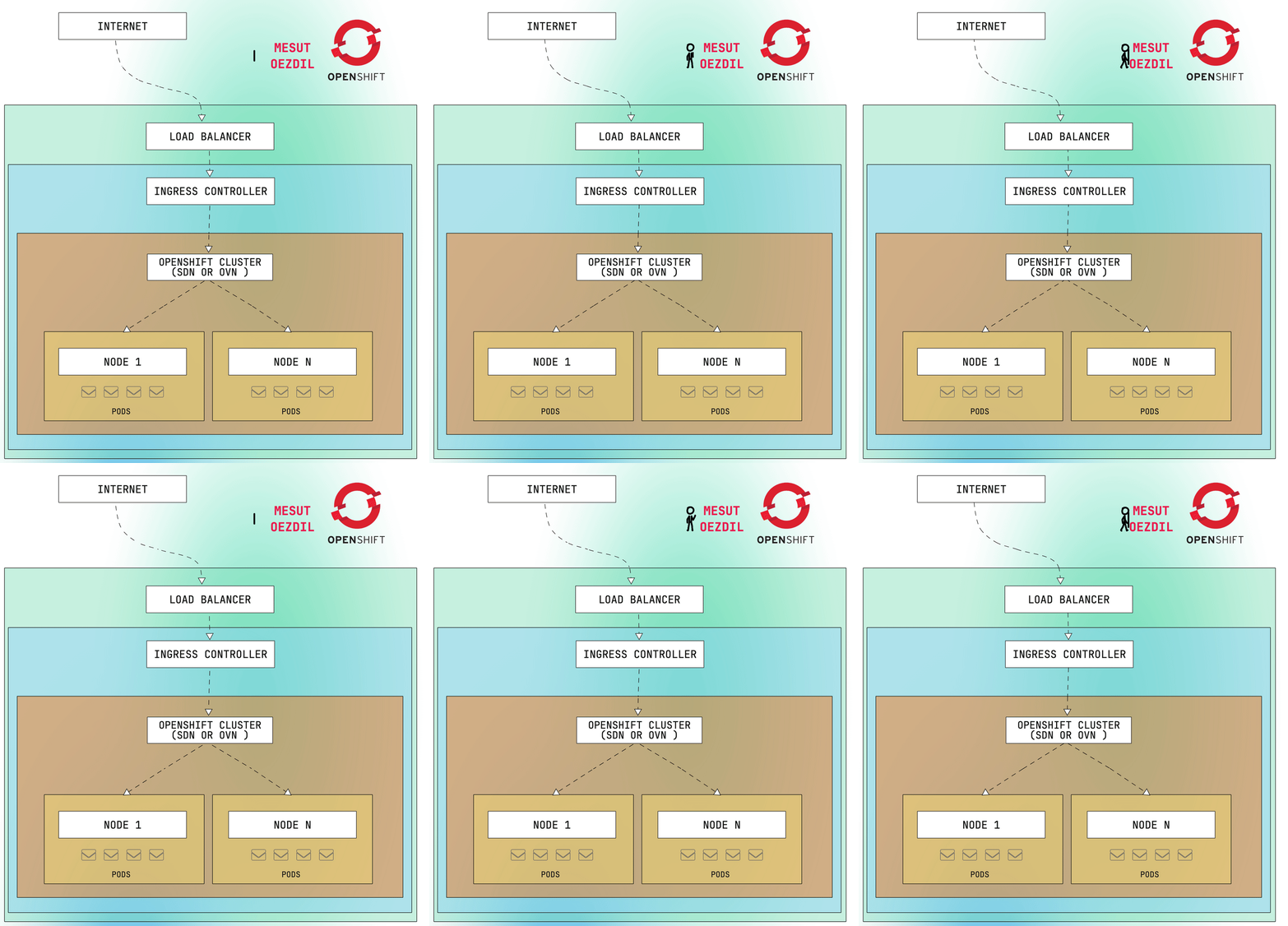
Internal Communication (Pod-to-Pod Communication)
OpenShift uses CNI plugins to manage internal pod networking. CNI plugins handle IP assignment, routing, and security for OpenShift pods. Each pod receives a unique IP address and communicates over the Cluster Network using K8s-native services. These services provide a stable Cluster IP to access pods across nodes.
Supported CNI plugins include OpenShift SDN (default in older versions) and OVN-Kubernetes (default in OpenShift 4.6+). These plugins facilitate pod networking, traffic policies, and service connectivity. Well, what is this SDN?
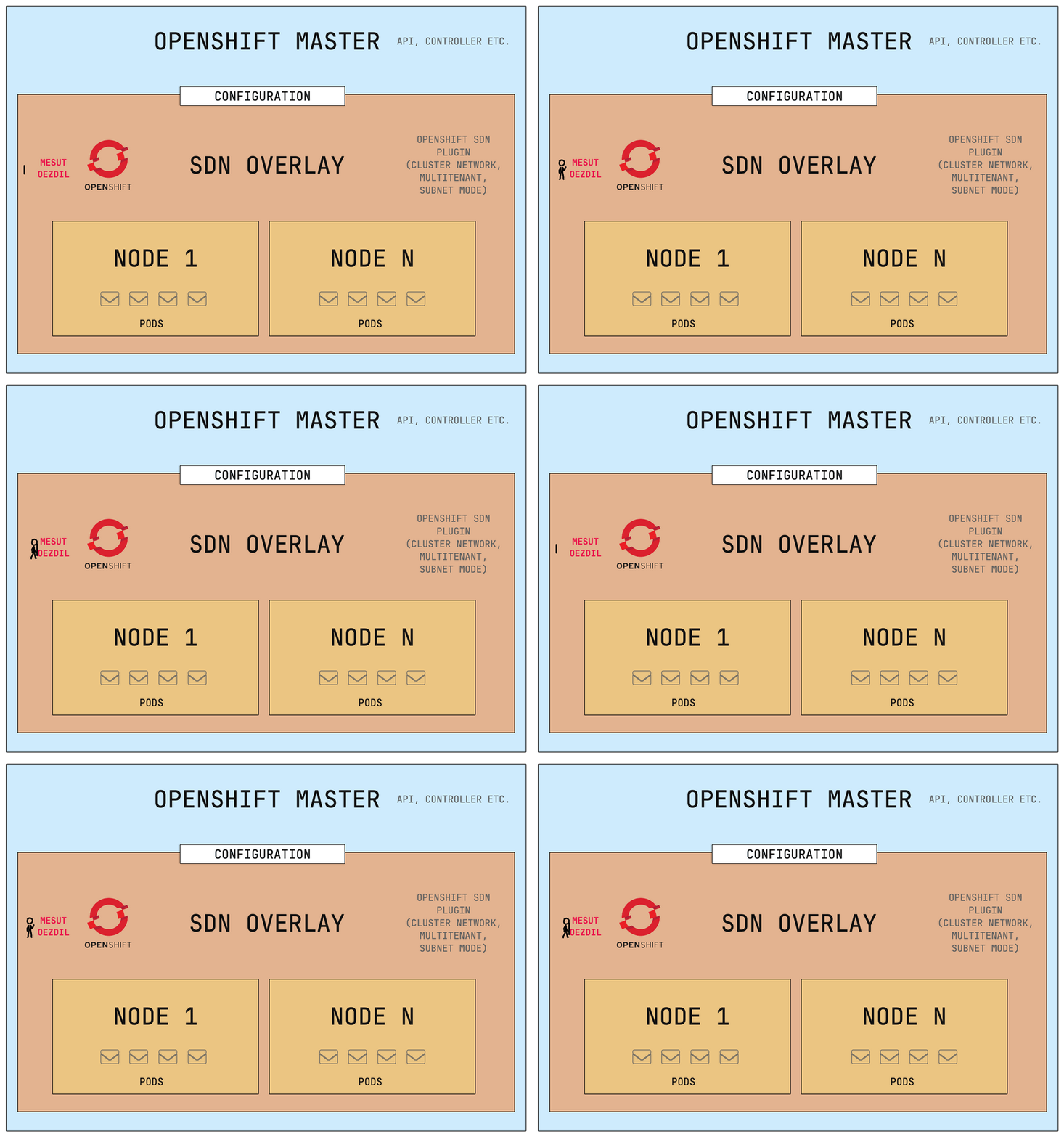
☞ Software-Defined Networking (SDN)
OpenShift SDN is a built-in CNI plugin that manages pod communication and enforces policies using software-defined overlays. It offers three operational modes:
Cluster Network Mode ⇢ All pods can communicate freely across the cluster
Multitenant Mode ⇢ Enforces isolation between projects (namespaces)
Subnet Mode ⇢ Each node has its own subnet for pod IPs
OpenShift SDN is now deprecated in favor of OVN-K8s, which is the default CNI plugin since OpenShift 4.6. SDN is simple to use and good for small-to-medium systems but might struggle in larger setups. OpenShift SDN’s centralised control plane can become a bottleneck in clusters with 1000+ nodes.
Open vSwitch (OVS) powers SDN, creating virtual bridges and supporting overlay technologies like VXLAN or GENEVE. Features of OVS include:
⇥ Virtual bridging of pod traffic
⇥ Flow control using OpenFlow rules
⇥ MAC address management
⇥ Overlay networking using VXLAN or GENEVE
VXLAN is used with OpenShift SDN to expand virtual networks. GENEVE is supported by OVN-K8s and offers enhanced flexibility compared to VXLAN.
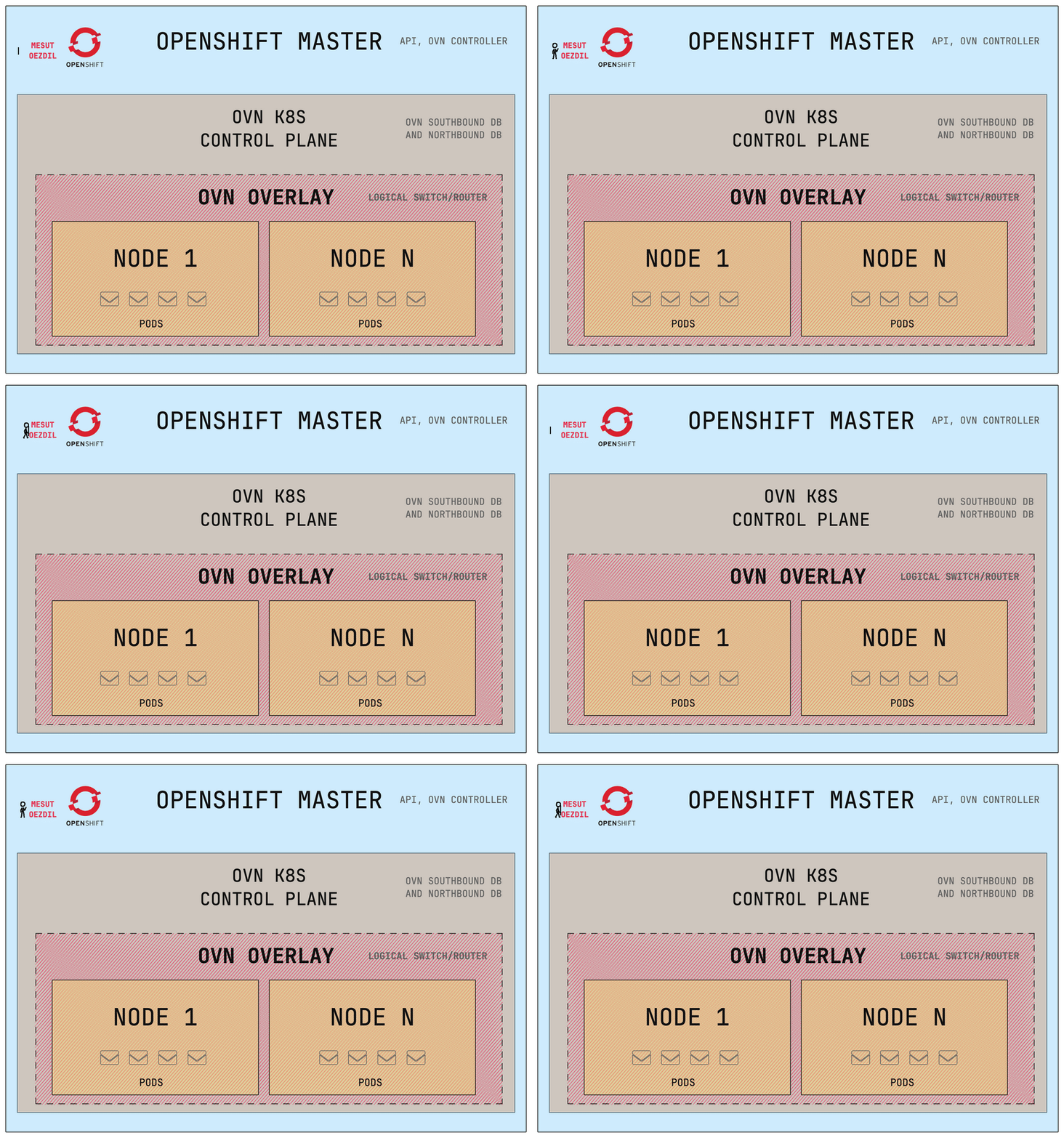
☞ OVN-Kubernetes
OVN-K8s has replaced OpenShift SDN as the default CNI provider, offering enhanced scalability, security, and flexibility for modern OpenShift deployments. Built on Open Virtual Network (OVN), this plugin introduces a logical networking architecture that leverages:
⇥ Logical switches/routers (managed through OVSDB)
⇥ Distributed control plane (improves scalability vs SDN’s centralised model)
⇥ GENEVE encapsulation (more flexible than VXLAN)
The traditional OpenShift SDN modes (Cluster/Multitenant/Subnet) are superseded by OVN’s unified architecture, which provides:
⇥ Automated IP address management (no manual subnet allocation)
⇥ Distributed east-west routing (no single chokepoint)
⇥ Integration with OpenStack/VM workloads (via OVN provider)
While OVN introduces minimal overhead (~5-8% vs SDN), its distributed architecture scales better beyond 500 nodes.
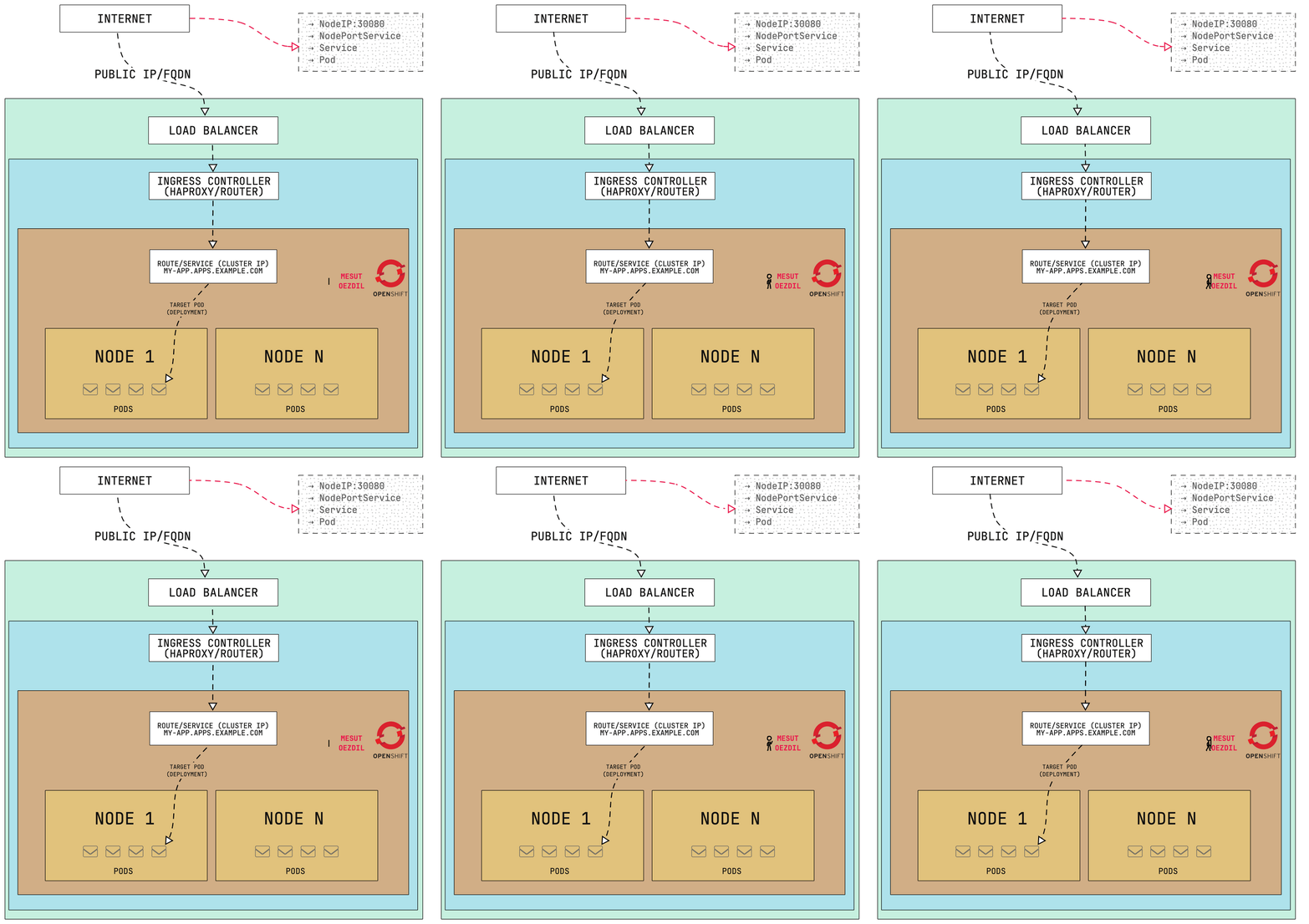
External Communication
I hope that the internal communication has become clear in a nutshell. In fact, for those familiar with the k8s structure, the external structure will be similarly obvious. OpenShift exposes services to external users using three main mechanisms:
NodePort: Binds services to a static port on each worker node. Suitable for development or testing but not recommended for production. Binds services to a static port (30000-32767) on every worker node.
LoadBalancer: Integrates with cloud or on-prem load balancers (e.g., AWS ELB, Azure LB). Distributes external traffic to internal services.
Ingress Controller: A HAProxy-based controller that handles HTTP/HTTPS routing via OpenShift Routes. It’s the default and most flexible option for exposing web applications. And OpenShift’s HAProxy-based Ingress Controller (default) enables advanced L7 routing via Route objects.
The Ingress Controller receives incoming requests and maps them to the appropriate service within the cluster using DNS-based routing and predefined rules.
Routing in OpenShift
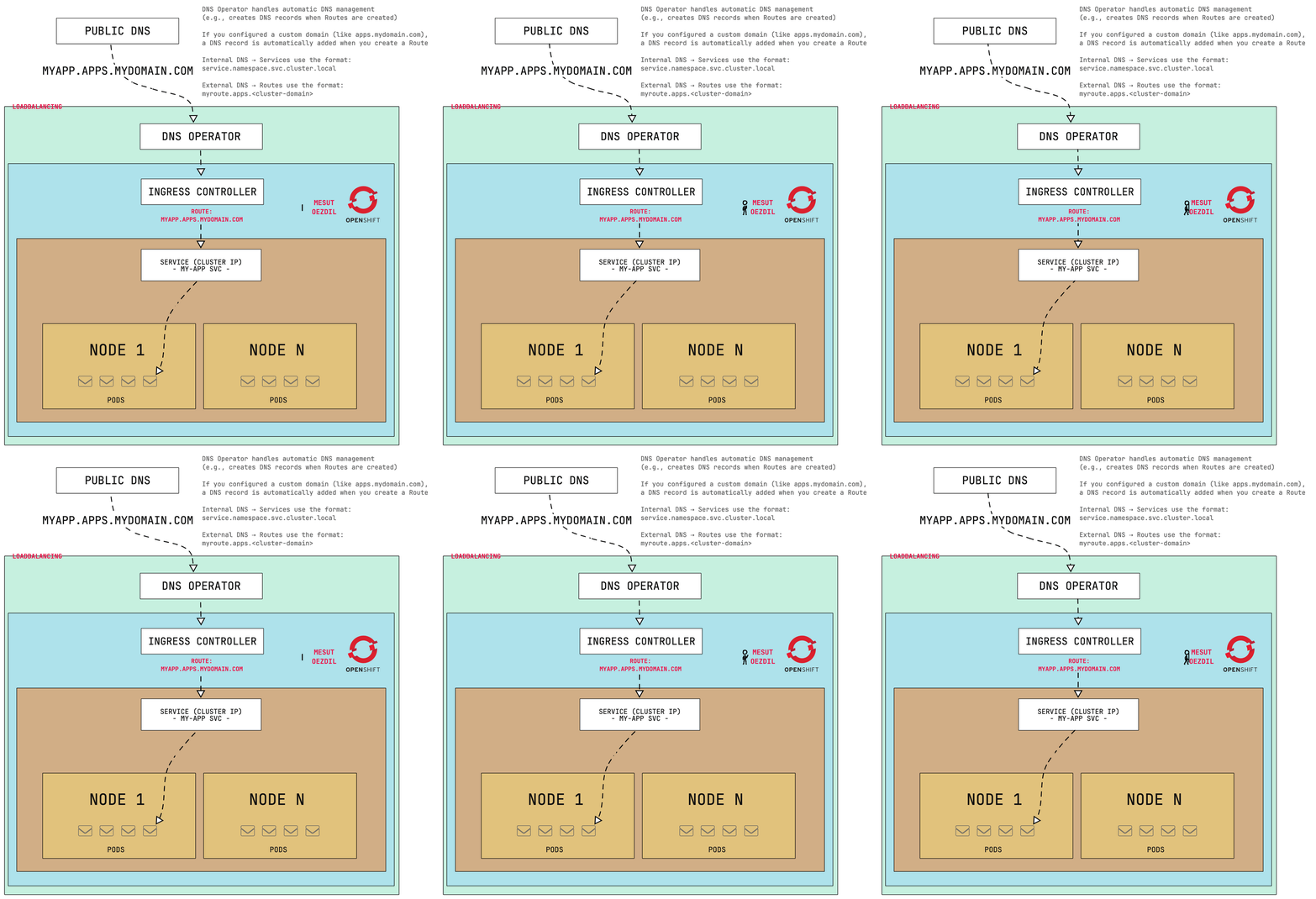
OpenShift leverages DNS-based service discovery and Route objects to manage both internal and external application access. Routes (custom resources in route.openshift.io/v1) expose services externally via the Ingress Controller. Each namespace automatically receives internal DNS addresses in the following format:
my-service.my-namespace.svc.cluster.localOpenShift Routes provide a mechanism to expose services externally through hostnames (e.g., myapp.apps.example.com). When a Route resource is created, OpenShift’s Ingress Controller (typically the HAProxy-based default ingress controller) processes hostname and path-based routing rules specified in the Route definition and forwards external traffic to the appropriate backend service. However, the OpenShift DNS Operator itself typically manages internal cluster DNS resolution (*.cluster.local) rather than external DNS records. External DNS management (like creating a DNS entry such as myapp.apps.example.com) usually requires:
⇥ Manual DNS configuration (if external DNS is managed separately)
⇥ Integration with the OpenShift ExternalDNS Operator (if automation is desired)
By default, OpenShift doesn’t automatically create external DNS entries unless you specifically configure it using an additional operator like the ExternalDNS Operator. Last but not least, when a Route resource is created:
⇥ The Ingress Controller (default is HAProxy-based) inspects the Route definition,
⇥ Based on the specified hostname and optional path rules, it routes incoming external traffic to the correct backend service within the cluster,
⇥ External DNS records (e.g., myapp.apps.example.com) are typically managed separately, either manually or via OpenShift’s ExternalDNS Operator.
Service Mesh
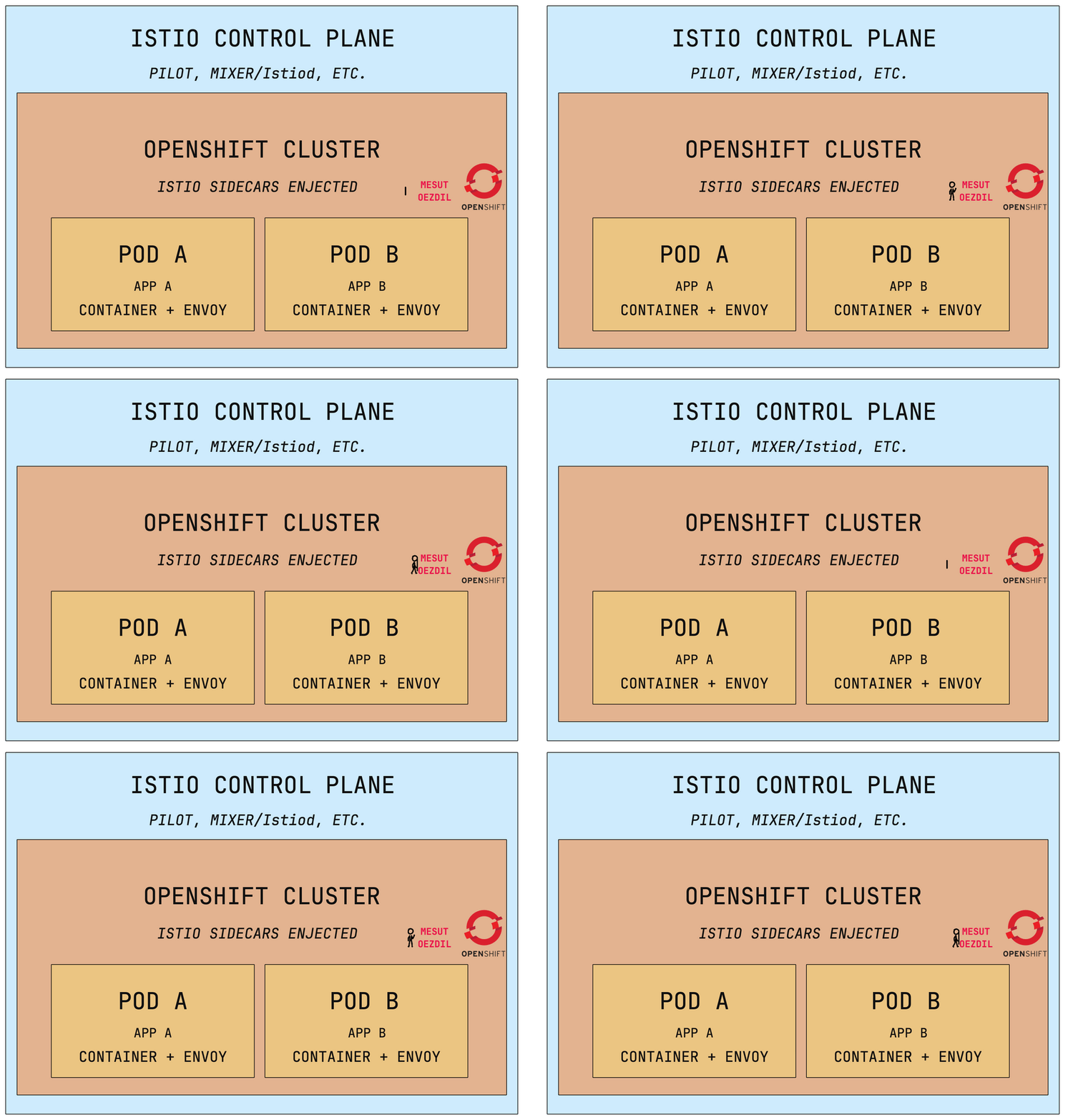
It is also important to address this point. OpenShift provides robust support for Service Mesh, enabling secure and observable communication between microservices within the cluster. The primary implementation is the OpenShift Service Mesh (OSSM), built upon the Istio service mesh framework.
Service Mesh capabilities include:
Traffic Management ⇢ Intelligent load balancing, advanced routing rules, circuit breaking, retries, and traffic shifting.
Security ⇢ Secure service-to-service communication enforced via mutual TLS encryption.
Observability ⇢ Integrated monitoring capabilities including metrics collection, distributed tracing, and logging.
And how it works? Each pod participating in the service mesh contains an Envoy sidecar proxy, which intercepts and manages all incoming and outgoing network traffic. The Istio Control Plane (primarily Istiod in modern Istio versions) centrally manages and distributes configuration and policy settings to the Envoy proxies. OpenShift Service Mesh leverages Kubernetes Operators to streamline the deployment, configuration, and lifecycle management of all mesh components, significantly simplifying operational complexity.
Egress (Outbound Traffic) Management
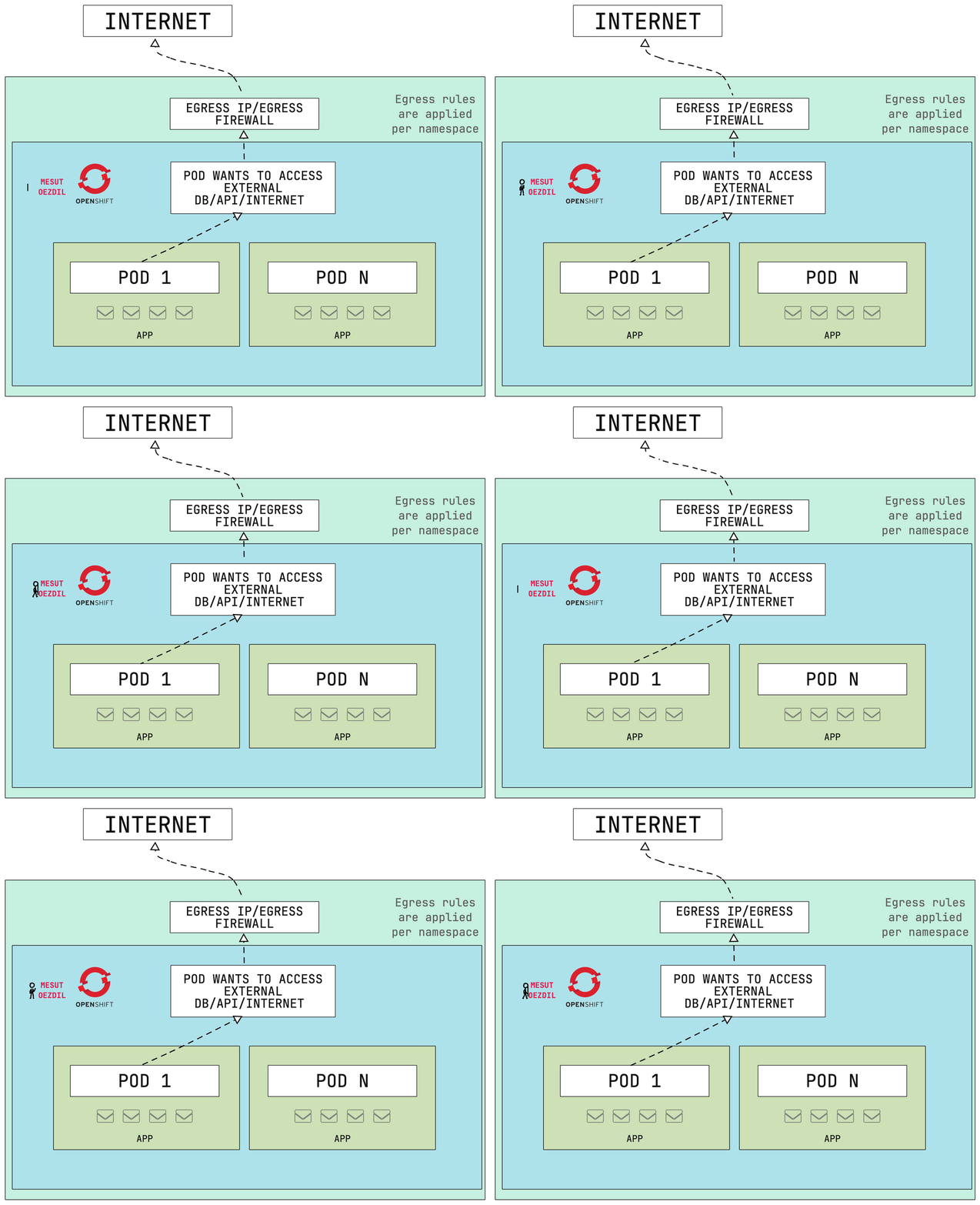
Egress defines how Pods within your OpenShift cluster access external networks such as the internet or third-party services. It determines which IP addresses are used for outbound traffic and controls which domains or IP ranges can be reached.
In some scenarios, it is necessary for Pods to consistently use a fixed external IP address—for example, to comply with firewall rules or access control lists enforced by external APIs or databases that only allow traffic from known IPs.
In OpenShift, egress IP management is handled by CNI plugins like OpenShift SDN or OVN-K8s. These plugins allow administrators to define which node handles outbound traffic and which external IP addresses are assigned. Egress firewall rules can also be applied to limit access to specific domains or IPs. For instance, you may want to allow traffic only to trusted domains such as *.mycompany.com while blocking all other external access. Common Use Cases Include:
⇥ Restricting traffic to specific external services or destinations
⇥ Allowing only approved IP ranges for outbound communication
⇥ Assigning fixed public IPs to Pods for predictable firewall rule configuration
OVN-Kubernetes offers built-in support for egress firewall policies, allowing fine-grained control over outbound traffic behavior per namespace.
DNS Management
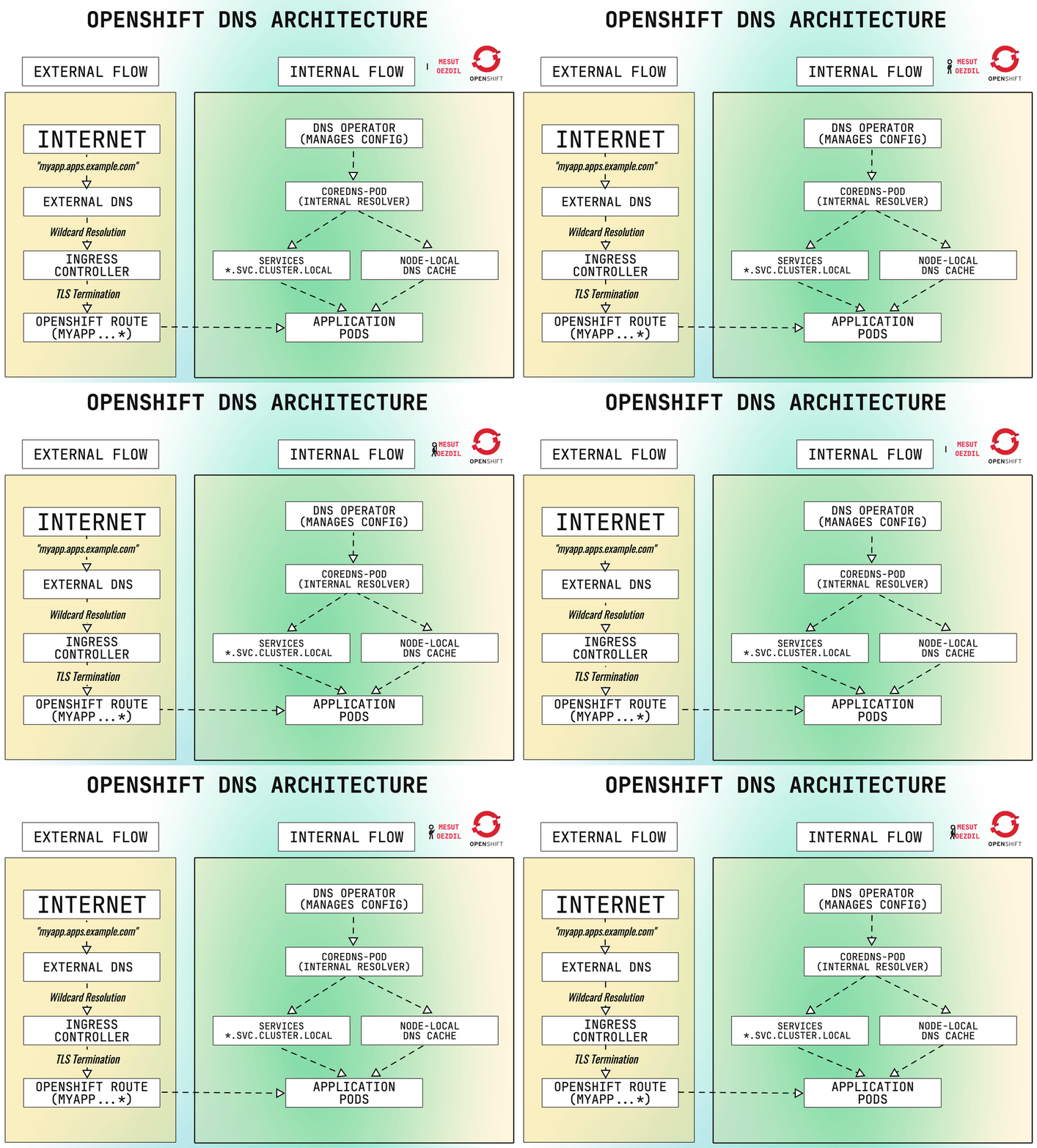
OpenShift provides comprehensive DNS resolution capabilities, automatically managing both internal and external networking components such as Services, Pods, and Routes. This integrated DNS functionality is crucial for seamless service discovery, efficient internal routing, and secure external exposure of workloads.
Internally, OpenShift assigns a predictable DNS record to every Service within a namespace using a standardized naming convention:
service-name.namespace.svc.cluster.localThese internal fully qualified domain names (FQDNs) ensure that Pods can reliably discover and communicate with other services within the cluster. The OpenShift DNS Operator manages internal DNS resolution by leveraging system-level components like dnsmasq or bind. As a system-level operator, it handles internal DNS queries efficiently, maintaining consistent performance and reliability.
Externally, the exposure of applications is achieved through Route objects. When a Route is created, OpenShift automatically generates a domain name following a structured convention:
<route-name>-<namespace>.apps.<cluster-domain>For example, creating a route named myapp in the dev namespace on a cluster with the base domain ocp4.example.com results in:
myapp-dev.apps.ocp4.example.comHowever, although OpenShift internally generates this route, making it resolvable externally typically requires further action. External DNS entries need to be configured either manually or via OpenShift’s ExternalDNS Operator. The ExternalDNS Operator seamlessly integrates with external DNS providers, such as AWS Route 53 or Azure DNS, automating public DNS record management.
To accommodate enterprise-level requirements, OpenShift supports extensive DNS customization options. Organizations can implement custom root domains or wildcard DNS entries for enhanced control over application routing and branding. Custom DNS management can be carried out manually or through automated API-driven approaches, provided proper DNS delegation and TLS certificate management procedures are established.
Starting with OpenShift 4.x, DNS configurations have become more flexible and are managed natively through Kubernetes Custom Resource Definitions (CRDs). This advancement allows administrators to easily define DNS forwarding rules, create private DNS zones, specify upstream resolvers, and utilize sophisticated DNS capabilities such as split-horizon DNS or namespace-specific DNS policies. Internal DNS queries within the cluster rely exclusively on the reserved cluster.local domain, whereas external DNS resolutions depend upon the cluster’s configured base domain. All DNS operations strictly adhere to OpenShift’s RBAC policies and namespace isolation principles, ensuring secure, compliant, and reliable DNS resolution.
Network Structure in terms of Security
Network security within OpenShift is enforced primarily through NetworkPolicies, a native Kubernetes mechanism designed to manage and control Pod-to-Pod and external communication. By default, many Container Network Interface (CNI) implementations allow unrestricted communication between Pods across namespaces and nodes. NetworkPolicies provide administrators the capability to override this behavior, implementing fine-grained rules based on criteria such as Pod labels, namespaces, IP address blocks, ports, and protocols.
A common scenario involves securing database services to ensure only authorized application components can access them. For instance, consider an environment where you have an application Pod labeled app=backend and another administrative Pod labeled app=admin. To ensure that only the backend application Pods can access a database Pod labeled app=database on port 5432/TCP, a specific NetworkPolicy would be configured. This policy explicitly allows access from the backend Pods while denying all other traffic, effectively creating a robust network security boundary.
NetworkPolicies in OpenShift are expressed through standard k8s YAML manifests and can be deployed using the command-line interface (oc apply -f <yaml_file>). Enforcement of these policies depends on the networking layer’s support, with plugins such as OVN-K8s fully compliant with K8s NetworkPolicies. Additionally, administrators can manage NetworkPolicies visually through the OpenShift Web Console, streamlining the process of defining and reviewing Pod and service traffic rules.
It’s crucial to recognise that the effectiveness and default behavior of NetworkPolicies can vary significantly depending on the underlying CNI plugin in use. Certain plugins operate under a permissive allow all by default model, whereas others implement a more restrictive deny by default strategy. In the restrictive model, explicit rules must be defined to allow necessary traffic, significantly influencing the cluster’s default security posture. Understanding these distinctions is vital when planning secure deployments, especially in multi-tenant or regulated environments.
Conclusion
So, that’s OpenShift networking in a nutshell! We’ve seen how OpenShift builds on standard k8s networking, adding powerful features like OVN-K8s for scalability, Service Mesh for secure microservices communication, and flexible DNS management for internal and external service discovery. NetworkPolicies help you define clear security boundaries, while Egress management ensures controlled external access. At the end of the day, getting comfortable with these concepts will make managing your OpenShift cluster easier and more secure—letting you focus less on infrastructure headaches and more on building great apps.